

Your KPIs Are Trapped in DAX


Your KPIs Are Trapped in DAX. Here’s How We Freed Them for Reporting, and an AI Analyst.
Every mature Power BI report has the same hidden liability: its business logic lives in DAX, and DAX goes nowhere. Metrics like Total Spend, International Spend %, Active Card Rate %, and others are locked in the semantic model as calculated measures. These are the definitions that make reports mean something. The day a stakeholder asks “can we see this in Tableau?” or “can we just ask an AI for last quarter’s international spend?”, you discover how trapped that logic is.
On a recent banking analytics engagement, we hit exactly this wall and built our way out. The result: a config-driven workflow that takes a Power BI report and emits two things from one source of truth:
- A tool-agnostic Snowflake BI layer that Power BI, Tableau, Looker, or Sigma can all consume without further heavy data aggregation required.
- Snowflake Semantic Views that ground Cortex Analyst or Snowflake Intelligence, so users can query the same KPIs in natural language. Because these views are exposed via Snowflake Cortex, any AI harness can reach them: Claude, Cursor, ChatGPT, or any tool that speaks to Cortex.
There's one catch in a regulated environment: migrated numbers have to match the originals to the penny. The workflow doesn't just translate. It proves it, metric by metric, before anyone trusts the result.
To make all of that repeatable across engagements, we built the workflow as an orchestrated set of eight Claude Code agents. This post covers our design decisions, what the DAX-to-SQL translation looks like, and how we made losslessness a gate for validity rather than a hope.
The shape of it, at a glance
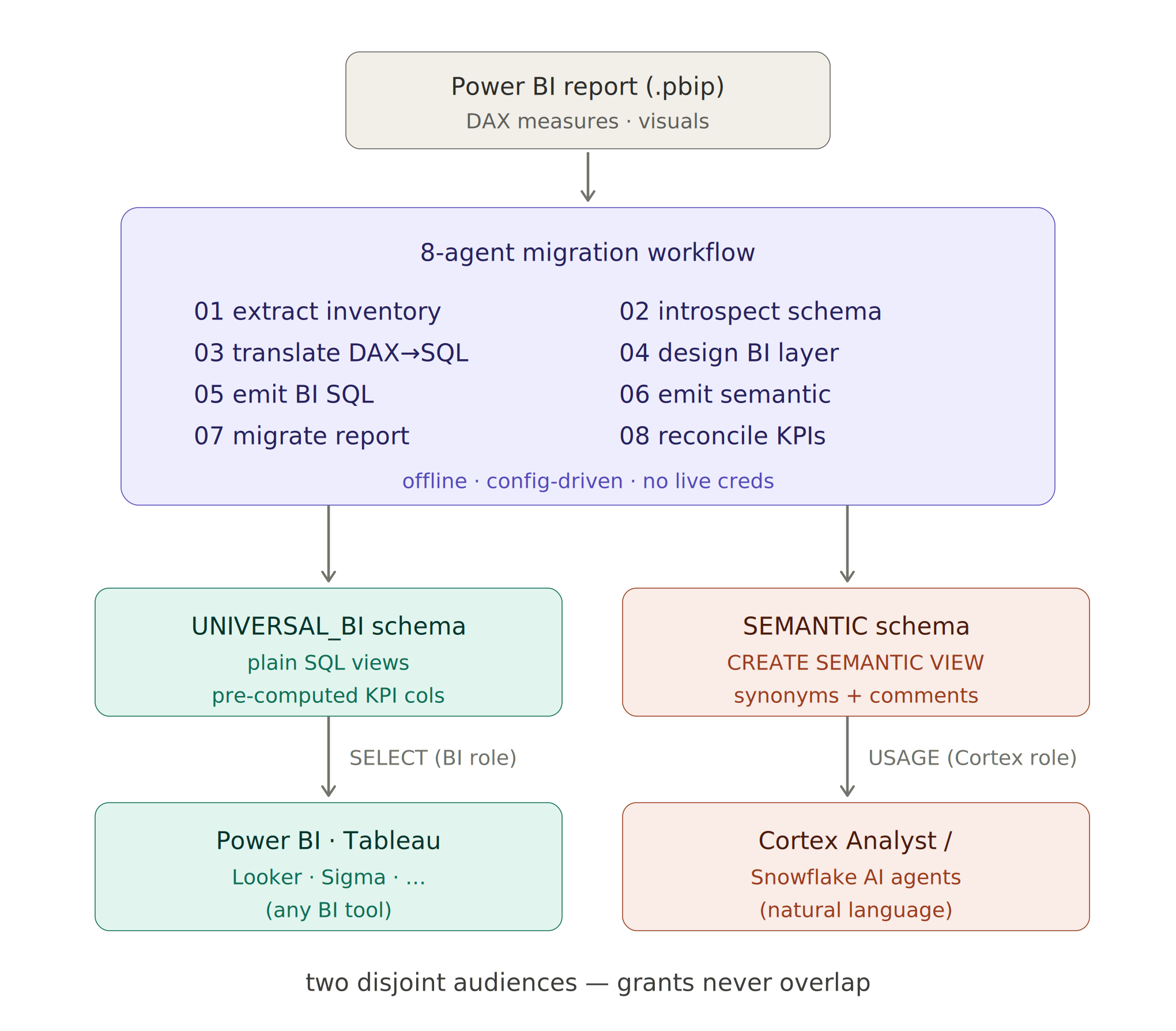
One source, two outputs: why the two outputs must stay separate
One Power BI report becomes two Snowflake artifacts by design. The workflow has a single source of truth but two incompatible consumers. BI tools (Tableau, Power BI, Looker, Sigma) need plain views they can SELECT from, while Cortex Analyst needs a Semantic View loaded with synonyms, metric definitions, and natural-language grounding. Snowflake Semantic Views are purpose-built for AI: they carry the context that lets Cortex translate "how many digital-only cards do we have?" into correct SQL.
So the workflow emits two disjoint outputs on purpose:
- DATA LAYER : plain Snowflake views where every metric is a pre-computed column. Any BI tool sums them with simple aggregations. No DAX, no MDX, no tool lock-in.
- SEMANTIC LAYER : a separate schema holding the CREATE SEMANTIC VIEW object, granted only to the AI/Cortex service role.
Most BI tools cannot connect directly to Snowflake Semantic Views. They error out or produce empty reports, unable to interpret the extra context. The generator writes two separate grant scripts. Each script carries a comment header warning the person running it not to apply it to the wrong audience, and a final assertion confirms that the BI role and the Cortex role never share a permission.
The translation: from DAX measure to grounded metric
The card-portfolio report carried 34 DAX measures, 27 of them live (used in a visual). The workflow translates every measure. The two below are the instructive examples (a chained ratio and a lossy distinct count) that show the patterns the rest follow.
The real work is lifting DAX filter-context logic into equivalent SQL. Take International Spend %, a measure found in any mature card-portfolio report, as an example. In Power BI it can require three chained measures:
Before – DAX:
International Spend % =

COALESCE(

 DIVIDE(

 [International Spend],

 [Domestic Spend] + [International Spend]

 ),

 0

)

-- ...which in turn reference these two:

International Spend =

COALESCE(

 CALCULATE(

 [Total Spend],

 NOT ISBLANK('DIM_MERCHANT'[COUNTRY_CODE])

 && NOT ( UPPER('DIM_MERCHANT'[COUNTRY_CODE])

 IN { "US","USA","U.S.","U.S.A.","UNITED STATES","840" } )

 ),

 0

)

Domestic Spend =

CALCULATE(

 [Total Spend],

 UPPER('DIM_MERCHANT'[COUNTRY_CODE])

 IN { "US","USA","U.S.","U.S.A.","UNITED STATES","840" }

)
The CALCULATE filter context becomes a derived boolean on the enriched fact (IS_INTERNATIONAL_MERCHANT, resolved across the merchant join), and the measure becomes a single Snowflake expression. In the Semantic View it lands like this, fully annotated for Cortex grounding:
After – Snowflake Semantic View METRIC:
txn.INTERNATIONAL_SPEND_PCT AS COALESCE(

 DIV0NULL(

 COALESCE(SUM(CASE WHEN IS_INTERNATIONAL_MERCHANT THEN TRANSACTION_AMOUNT END), 0),

 SUM(CASE WHEN IS_DOMESTIC_MERCHANT THEN TRANSACTION_AMOUNT END)

 + COALESCE(SUM(CASE WHEN IS_INTERNATIONAL_MERCHANT THEN TRANSACTION_AMOUNT END), 0)

 ),

 0

)

 WITH SYNONYMS = ('international spend percent', 'international share of spend',

 'foreign spend percentage', 'cross-border spend share')

 COMMENT = 'International spend as a share of domestic + international spend.

 Ratio (non-additive) — recompute per group.

 DAX: COALESCE(DIVIDE([International Spend],

 [Domestic Spend] + [International Spend]), 0).'
The WITH SYNONYMS and COMMENT clauses are what make this metric AI-ready: “cross-border spend share” and “foreign spend percentage” all resolve to the same metric, and the comment preserves the original DAX as provenance.
Additive vs. non-additive: the rule that makes it safe
The BI layer is trustworthy because it sorts every measure by whether a downstream tool can safely re-sum it:
- Additive measures (Total Spend, POS Spend, transaction counts) become row-level columns on the fact view. A BI tool can SUM them across any breakdown (by date, merchant category, or channel) and stay correct.
- Some metrics can't be expressed in the Semantic View: Snowflake rejects scalar subqueries in Semantic View metric expressions, so time-intelligence measures and other non-additive measures (ratios, distinct counts) go into fixed-grain metric views with every column flagged so a visual physically cannot re-aggregate it. For example, Active Card Rate % only means something at the portfolio grain. The framework enforces that.
Distinct counts are the classic trap. Active Card Count, for example, is a DISTINCT COUNT of card IDs. It does not sum across slices. The workflow translates it faithfully and labels it as a potential lossy conversion:
card.ACTIVE_CARD_COUNT AS COUNT(DISTINCT CASE WHEN IS_ACTIVE_CARD THEN CARD_ID END)

 COMMENT = 'Distinct count of active cards. LOSSY (DISTINCTCOUNT) and

 non-additive — reported at portfolio grain, do not re-aggregate.'
What we’ve also discovered is that some metrics can't cross to the Semantic Views. Snowflake rejects scalar subqueries inside Semantic View metric expressions, so time-intelligence measures (Spend MTD, YoY % Change) anchored to the latest fact date stay in the BI layer for Tableau/Power BI, while Cortex composes equivalents from the additive base plus a date filter. The generator excludes these metrics from the Semantic Views but documents each one for auditability.
The part a bank actually cares about: provable losslessness
A migration nobody can verify is a liability, not an asset. The final agent in this workflow emits a reconciliation script run directly in Snowflake post-deploy. For every materialized KPI it pairs the new value (read from UNIVERSAL_BI) against a reference value (the original DAX semantics recomputed independently against the source star), applies a per-metric tolerance, and flags PASS/FAIL:
SELECT

 kpi, new_value, ref_value,

 ROUND(ABS(new_value - ref_value), 6) AS abs_diff,

 tolerance,

 CASE

 WHEN new_value IS NULL AND ref_value IS NULL THEN 'PASS' -- both empty = agreement

 WHEN new_value IS NULL OR ref_value IS NULL THEN 'FAIL'

 WHEN ABS(new_value - ref_value) <= tolerance THEN 'PASS'

 ELSE 'FAIL'

 END AS ok

FROM kpi

ORDER BY kpi;
Tolerances are chosen per metric type: 0 for counts (exact or bust), 0.01 for dollar amounts (a penny), 0.0001 for ratios. The comparison is null-aware. In the case where both are NULL, the test passes. One NULL is considered a real disagreement, not a rounding artifact. These validations also go beyond grand totals, querying any metrics summing up a grand total, because a grain or join bug hides perfectly inside a matching grand total and only surfaces when you slice:
-- BREAKDOWN SANITY: Total Spend by MERCHANT_CATEGORY (top 5)

-- Additive measure over a dim attribute — exact match expected.
A report isn’t considered migrated until that script runs green.
Under the hood: the eight agents
A single command against one per-report config file dispatches eight specialized agents in a fixed order. Some run in parallel; each phase pauses for inspection before the next begins:
Step 1: 01 ‖ 02 inventory the report + introspect the Snowflake schema
Step 2: 03 → 04 translate DAX → SQL, then design the BI layer
Step 3: 05 ‖ 06 ‖ 07 ‖ 08 emit BI SQL · semantic view · migrated report · reconciliation
Step 4: summary
1. Extract the Power BI inventory. Reads the report's source files and produces a structured inventory of every table, measure (with its raw DAX and number-format string), relationship, and visual binding. It also distinguishes live measures (used in a visual) from dead ones, so the migration carries only what the report uses. Crucially, it pulls the Snowflake connection details out of the report (account, warehouse, role, database) rather than from a config file, so credentials and environment names never live in a tracked config.
2. Introspect the Snowflake schema. Builds a schema graph from committed INFORMATION_SCHEMA dumps, ensuring the agents use no live database connection, ever. It parses view definitions to trace lineage and recommends a source for each table the report needs. This is also where it learns the silver-to-conformed recipe: how raw source columns (CARDID, LOCKREASONTYPECODE) become the clean, conformed names the report’s measures expect (CARD_ID, LOCK_REASON_TYPE_CODE).
3. Translate DAX to SQL. The heart of the workflow. For each live measure it applies any report-specific exclusions or hand-written overrides, then auto-translates the DAX into Snowflake SQL, turning CALCULATE filter contexts into CASE expressions and derived boolean flags, and routing time-intelligence measures (MTD, YTD, MoM/YoY) to a windowed strategy. Anything it can’t translate is flagged loudly rather than guessed.
4. Design the BI layer. Decides the shape of the output. It sorts every measure into additive (row-level fact columns) versus non-additive (fixed-grain metric views), clusters related metrics into themed views, and discovers which boolean/categorical columns to inline: e.g. a measure that filters CHANNEL = "ATM" tells it an IS_ATM flag belongs on the fact. When a conformed-name recipe exists, it reverse-engineers that transform so the new views produce the columns the report expects while reading only from the curated silver layer at runtime.
5. Emit the BI-layer SQL. Writes the deployable UNIVERSAL_BI views covering the schema bootstrap, enriched dimensions, the enriched fact with its additive measure columns, the non-additive metric views, an optional time-intelligence view, and SELECT grants to the BI service role only. Each file header lists the DAX measures it materializes so a reviewer can trace KPI lineage at a glance.
6. Emit the Semantic View. Writes the separate SEMANTIC schema and the CREATE SEMANTIC VIEW object for Cortex Analyst. These objects are tables, dimensions, facts, and metrics, each with the WITH SYNONYMS and COMMENT clauses that give the AI strong grounding. It grants USAGE to the Cortex role only, behind an explicit do-not-grant-to-BI banner, and drops the metrics Snowflake can’t express (scalar subqueries) behind a comment naming each one. Crucially, because this semantic layer lives in Snowflake and is accessed through Cortex, it is AI-tool agnostic: Claude, Cursor, ChatGPT, or any agent framework that can call Cortex can query these KPIs in plain English against the same governed definitions.
7. Migrate the Power BI report. Copies the original report to a parallel (the original is never touched). It then repoints the copy at the new UNIVERSAL_BI schema, strips every DAX measure, adds the pre-computed columns with their original format strings, and rebinds every visual to the matching column. It writes MIGRATION_NOTES.md documenting every DAX-to-SQL mapping and flagging any lossy rollups or grain caveats for sign-off.
8. Reconcile the KPIs. Emits the verification script described above for every materialized measure. This SQL Script produces a side by side view of the new value vs. reference value, per-metric tolerance, PASS/FAIL status for every KPI in the report. This is the gate: every KPI must pass or the report isn’t migrated.
Agents hand off through intermediate files. You can open any stage's output, inspect it, adjust the config, and re-run.
Why agents, not a script?
This could have been a Python script. We made eight cooperating agents because the work is iterative and judgment-heavy. Consultants can tweak a metric cluster, supply a translation override for a gnarly measure, and re-run the workflow as needed. We wanted to prevent drift on the most important factors: PII isolation, additive/non-additive separation, the two-audience grant split. Encoding these decisions in agent contracts means every engagement gets the same governed result.
Additionally, the whole pipeline runs offline against the report and committed schema dumps and emits SQL for a human to deploy through normal change management, so it never needs a live credential, and it reproduces identically across sessions.
The takeaway
Your Business KPIs don't have to die in DAX — or stay locked in any single tool. The same definitions can feed every BI tool in your stack and ground an AI analyst that answers in plain English with a reconciliation harness that proves, metric by metric, that nothing was lost in translation.
The future of analytics isn't tied to a single dashboarding tool. It's built on governed business definitions that can power reporting, automation, and AI from a common foundation. At Ippon, we help organizations design and implement modern data platforms that make that future possible across Power BI, Tableau, Snowflake, AI copilots, and emerging analytics experiences.
Explore our Data, AI, and Cloud services at ipponusa.com.

Comments